Class 12 Commerce . Accountancy . Computerised Accounting System . Overview of Computerised Accounting System
Chapter 1: Overview Of Computerised Accounting System
Ch 1
Accountancy
Class 12 Commerce
Introduction
Introduction to Computerised Accounting
Why businesses use computers and IT
- Speed and accuracy: Computers help process accounting transactions quickly and accurately, with timely access to information.
- Decision-making: Timely information supports business decisions, strengthens competitive advantage and can improve profitability.
Computerised Accounting System (CAS) — A system that processes accounting transactions using hardware and software to produce accounting records and reports.
| Component | Meaning |
|---|---|
| Procedure | A logical sequence of actions used to perform a task. |
| Data | Raw facts entered as input for a business application. |
| People | The users of the system. |
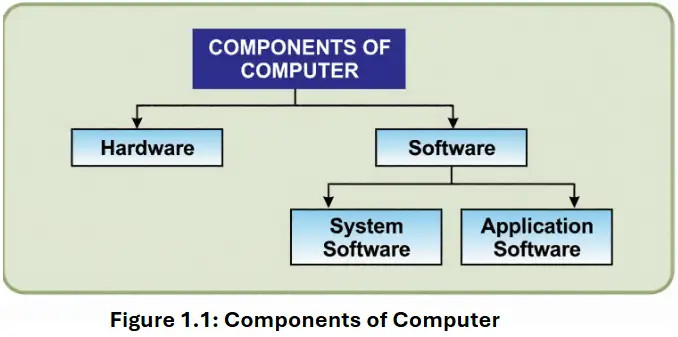
| Hardware | The computer, associated peripherals and their network. |
| Software | System software and application software. |
Processing Transactions and Producing Reports
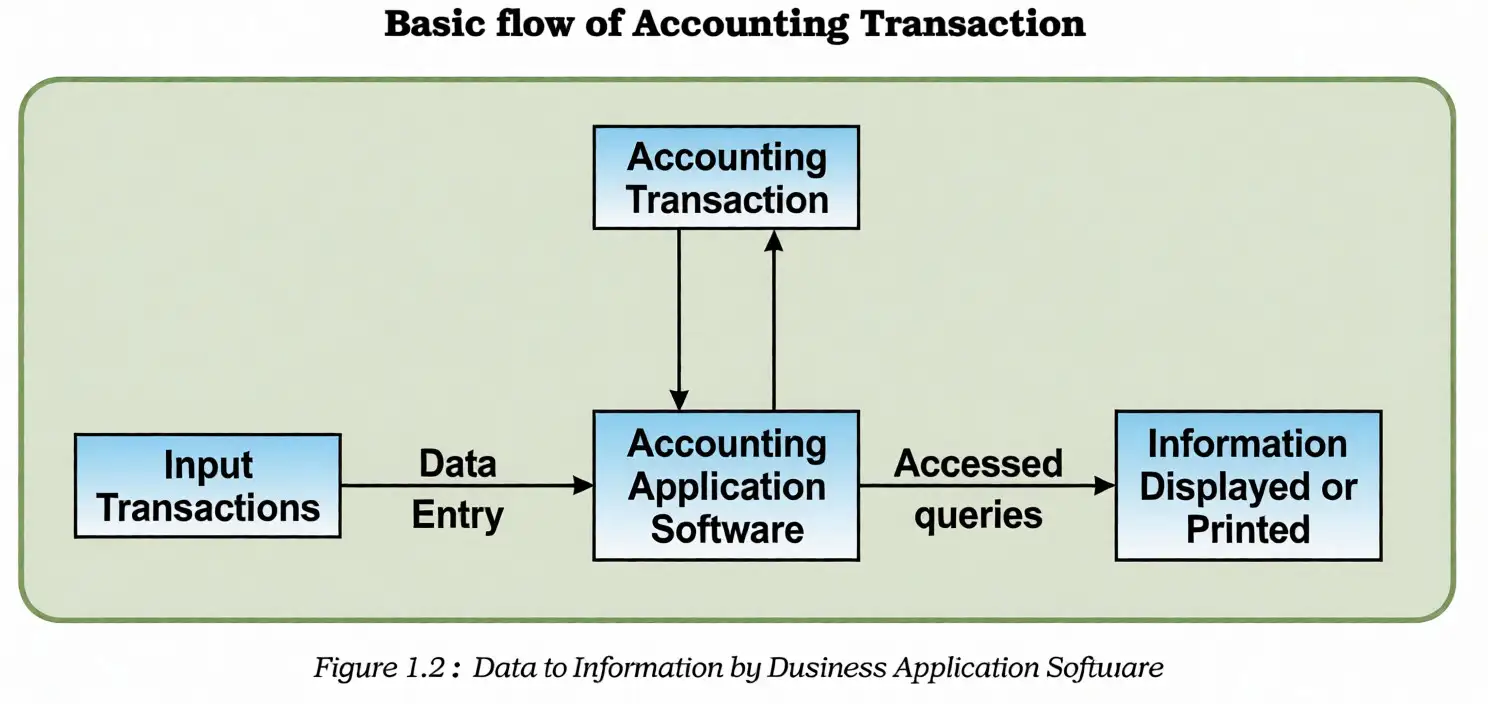
CAS processing
- Accounting transactions are entered as inputs.
- Accounting software processes the transaction data.
- The system generates accounting records and reports, which can be displayed or printed.
Reports produced by CAS
- Day books/Journals record transactions.
- Ledger groups transaction entries by account.
- Trial Balance lists account balances.
- Position Statement (Balance Sheet) and Statement of Profit and Loss report financial position and performance.
Data and Information
Data item (data element) — The smallest named unit of data in an information system.
Transaction data
- Accounting transaction: A record of the inflow and outflow of resources.
- Four data elements: Account name, accounting code, transaction date and amount.
- Processing: Transaction data is processed by accounting software to create information such as journals and ledgers.
| Point | Data | Information |
|---|---|---|
| Meaning | Raw facts or inputs. | Data processed to meet a decision-maker’s needs. |
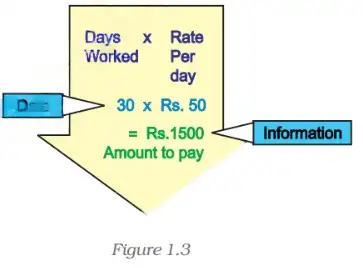
| Example | Days worked and rate per day. | The resulting amount payable. |
Multiply the number of days worked, , by the rate per day, , to find the amount payable, .
Information at one level can serve as data at another; after further processing for a decision-maker’s needs, it becomes information at that level.
Name the five components of a Computerised Accounting System.
List four data elements in an accounting transaction.
Quick recap
- CAS uses hardware and software to process accounting transactions into records and reports.
- The five CAS components are procedure, data, people, hardware and software.
- CAS can produce journals, ledgers, trial balances and financial statements.
- A transaction records resource inflows and outflows and has four key data elements.
- Processing raw data produces information for users and decision-making.
- Information at one level may become input data for further processing.
Components Of CAS
Accounting Cycle
Stages of the accounting cycle
- Analyse business transactions.
- Record the transactions in the journal.
- Post journal entries to ledger accounts.
- Prepare a trial balance from account balances.
- Review accounts and make necessary adjustments.
- Post adjustments to the ledger and prepare the adjusted trial balance.
- Use the adjusted trial balance to prepare the balance sheet and profit and loss account.
- Prepare financial statements from the finally adjusted ledger and balanced accounts.
Computerised processing
- Computer processing: The accounting cycle can be carried out using computers.
Multiply the number of days worked by the daily rate to calculate the amount to pay.
Salient Features of CAS
| Feature | Key points |
|---|---|
| Simple and integrated | Automates and connects sales, finance, purchases, inventory and manufacturing. It provides accurate, up-to-date information quickly; it may also support MIS, multilingual use and organised data. |
| Transparency and control | Improves access to vital information and visibility of day-to-day operations, allowing more time for planning and supporting user satisfaction. |
| Accuracy and speed | User-definable data-entry templates support fast, accurate transaction entry and help generate documents and reports. |
| Scalability | Adjusts to changes in data-processing volume and can be used by organisations of different sizes and types. |
| Reliability | Helps ensure critical financial information is accurate, controlled and secure. |
Quick recap
- The accounting cycle identifies, measures and communicates information through journals, ledgers, trial balances and adjustments.
- Financial statements are prepared according to GAAP; the manual system has traditionally been the most popular record-keeping method.
- Computers can process the accounting cycle.
- CAS integrates business operations and helps provide accurate, up-to-date information.
- The key CAS features are simplicity and integration, transparency and control, accuracy and speed, scalability, and reliability.
Grouping Of Accounts Parts I
Accounting Equation and Account Groups
Accounting equation — The accounting equation expresses the equality between a business’s assets and the claims against those assets.
Equities comprise liabilities and capital.
What the equation represents
- A = assets; E = equities; L = liabilities; C = capital.
- Liabilities represent creditors’ claims; capital represents owners’ claims.
- Profit or loss changes the owners’ claim and is summarised through the income statement.
Revenue increases capital; expenses consume resources in earning revenue.
Revenue — An inflow of resources from selling goods or services in the normal course of business, increasing capital.
Expenses — Resources consumed while generating revenue.
Main Groups of Accounts
| Main group | Subgroups and accounts |
|---|---|
| Shareholders’ funds | Share capital; reserves and surplus; money received against share warrants; share application money pending allotment |
| Non-current liabilities | Long-term borrowings; deferred tax liabilities (net); other long-term liabilities; long-term provisions |
| Current liabilities | Short-term borrowings; trade payables; other current liabilities; short-term provisions |
| Main group | Subgroups and accounts |
|---|---|
| Non-current assets | Fixed assets: tangible assets, intangible assets, capital work-in-progress, intangible assets under development, fixed assets held for sale; non-current investments; deferred tax assets (net); long-term loans and advances; other non-current assets |
| Current assets | Current investments; inventories; trade receivables; cash and cash equivalents; short-term loans and advances; other current assets |
| Group | Examples |
|---|---|
| Revenues | Sales; other income |
| Expenses | Material consumed; salary and wages; manufacturing expenses; depreciation; administrative expenses; interest; selling and distribution expenses |
Why classification matters
- Classification organises the growing volume of transaction data into useful account groups.
- Hierarchy links each main group to its subgroups and individual accounts.
- Codification assigns identifiers that preserve this hierarchy and support preparation of the Balance Sheet and Statement of Profit and Loss.
Codification of Accounts
Code — An identifying mark made of letters or figures that gives information a concise form and supports machine processing.
Purpose and structure
- Account-head codes should group accounts at different levels to produce the Balance Sheet (Position Statement) and Statement of Profit and Loss.
- First digit identifies the top-level account group; further digits identify subgroups.
- Ascending order of codes automatically lists accounts in the intended hierarchy.
- Gaps between subgroup codes leave room to add groups later.
| Code | Account group |
|---|---|
| Equity and liabilities | |
| Assets | |
| Revenues | |
| Expenses | |
| Shareholders’ funds | |
| Non-current liabilities | |
| Current liabilities | |
| Non-current assets | |
| Current assets |
Codes keep accounts in order
Read the code from left to right: the first digit gives the broad group, and later digits narrow it to subgroups and accounts.
Quick recap
- The accounting equation is , or assets = liabilities + capital.
- Profit or loss affects owners’ claims; the expanded equation is .
- Accounts are classified into equity and liabilities, assets, revenues, and expenses.
- Assets and liabilities are further grouped as current or non-current where applicable.
- Codes represent account groups at successive levels and support financial statement preparation.
- Listing codes in ascending order displays accounts in the intended hierarchy; gaps allow flexibility.
Grouping Of Accounts Parts II
Sequential Codes
Which code is missing from the sequence CL001, CL002, CL004?
- Compare the document codes CL001, CL002 and CL004 in order.
- The sequence skips CL003, so that code may relate to a missing document.
Block Codes
What dealer type does code 325 represent?
- Code 325 falls within the range 300–399.
- The 300–399 block is assigned to pipes.
Mnemonic Codes
Give the mnemonic code for Head Quarters.
- Take the initial letters of Head Quarters.
- Use HQ as the abbreviation-based code.
Developing a Coding Structure
Student Code Structure
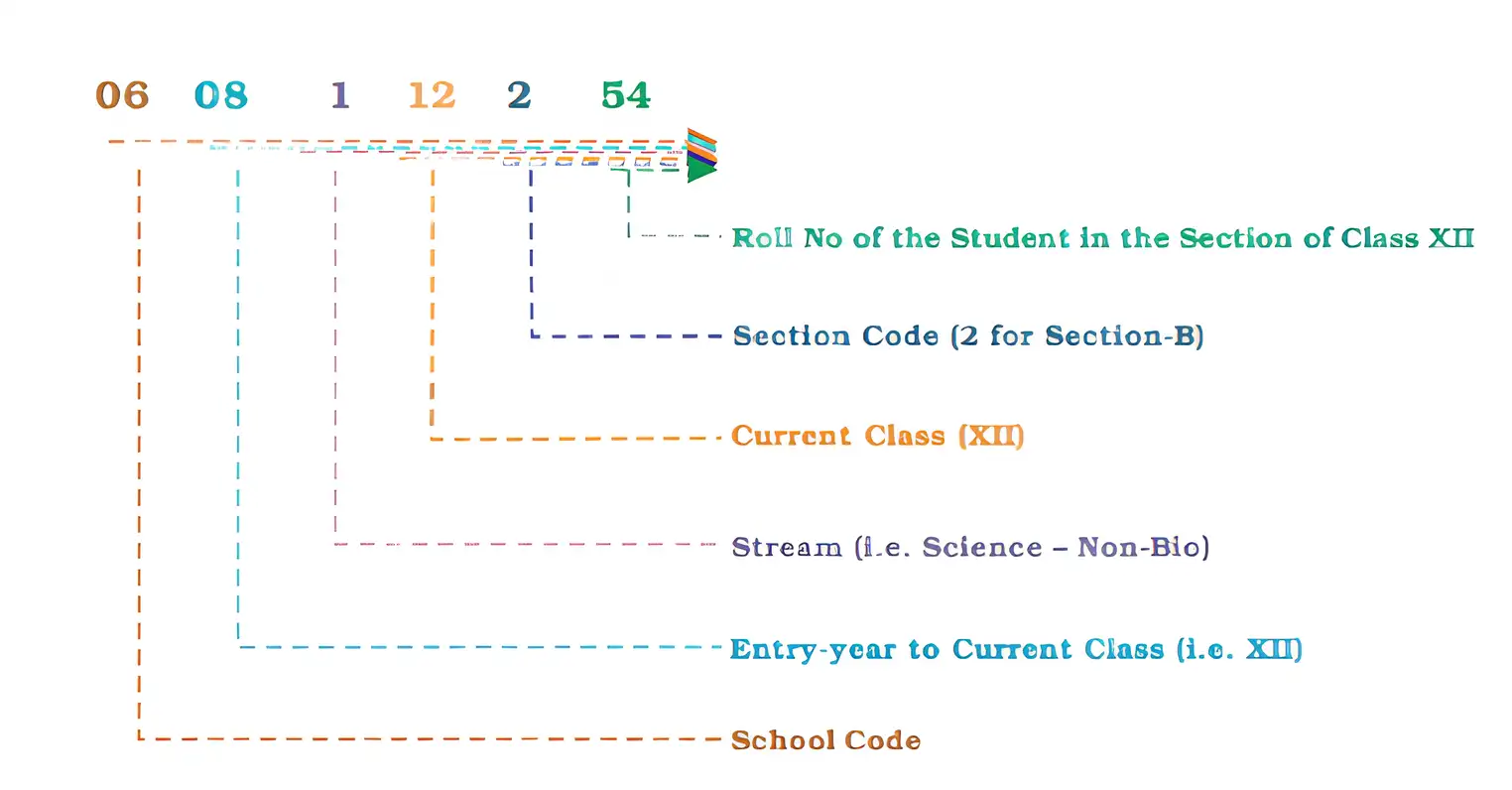
- Order: School → Entry-year → Stream → Class → Section → Student.
- Length: The six segments use a total of 10 digits.
- Information available: The code can identify the student's school, entry year, stream, class, section and student number.
- Record search: Codes can help list students who entered a particular school in a given year.
Assigning a Student Code
- Identify the value of each student attribute in the planned hierarchy.
- Convert each value to its assigned code and required digit length.
- Arrange the segments in the specified order, retaining leading zeroes.
What code can be formed for student 54, who entered Section B of Class XII in 2008, chose Science (non-biology; stream code 1), and attends School 6?
- School 6 is written as 06, and entry-year 2008 is represented by 08.
- Use stream code 1, Class XII as 12, and student number 54.
- The section is Section B, but the section-letter-to-digit mapping is not given.
- Arrange the known segments in order and leave the section digit undetermined: 06 | 08 | 1 | 12 | ? | 54.
A trading firm assigns codes 200–299 to medium pumps. What type is code 248?
What does stream code 0 indicate for primary or secondary classes?
How many digits are assigned to the Student segment, and how many students in a section does it accommodate?
Quick recap
- Sequential codes use consecutive numbers and/or letters to trace documents and spot missing codes.
- Block codes assign number sub-ranges to specific groups.
- Mnemonic codes use letters or abbreviations to represent information.
- A coding structure follows an attribute hierarchy and assigns enough digits to each segment.
- The student code has 10 digits: school, entry-year, stream, class, section and student number.
- Use stream code 0 when stream is not applicable; include a Trust segment if multiple trusts must be distinguished.
- The Section B code digit cannot be inferred without a section-to-digit mapping.
Using Software Of CAS
Using CAS Software
CAS Activities
- One-time activities: Set up organisation details, the accounting year and ledger types; these create master files.
- Recurring activities: Enter transactions and generate accounting reports.
Transaction Vouchers and Reports
- Vouchers: Transactions are entered using cash, bank, purchase, sales and journal vouchers.
- Books and statements: CAS can generate day books, ledgers, trial balance, Statement of Profit and Loss, Position Statement and Cash Flow Statement.
Security Features of CAS
Purpose
- CAS security: Protects the security, safety and confidentiality of accounting data.
| Feature | Meaning and purpose |
|---|---|
| Password security | A password is the code that allows access to the system. User rights can be set according to organisational policy, allowing access to some data while restricting other data. |
| Data audit | Shows who made changes to original data and what changes were made. It helps assign responsibility for manipulation and supports data integrity; it is similar to an audit trail. |
| Data vault | Provides additional protection through data encryption. |
Encryption — The process of scrambling information so that it is extremely difficult to interpret without decoding it.
How Encryption Protects Data
- Information is encrypted (scrambled).
- If it reaches the wrong hands, it remains extremely difficult to interpret.
- The receiver must decode it to read and understand the information.
Advantages of CAS
- Timely information: Generates reports on time and in the desired format.
- Efficient records: Supports efficient accounting record-keeping.
- Effective control: Helps maintain control over the accounting system.
- Economy: Makes the processing of accounting data economical.
- Confidentiality: Helps maintain data confidentiality.
Limitations of CAS
- Technology obsolescence: Rapid technological change requires investment at shorter intervals.
- Power interruptions: Data may be lost or corrupted.
- Hacking risk: Data is vulnerable to hacking.
- Report constraints: Reports that are not programmed or specified in the software cannot be generated.
Distinguish between one-time and recurring activities in CAS.
How do data audit and data vault protect CAS data?
Quick recap
- CAS has one-time setup activities and recurring transaction-entry and reporting activities.
- Transactions are recorded through cash, bank, purchase, sales and journal vouchers.
- Common reports include day books, ledgers, trial balance and financial statements.
- Password security restricts access, data audit tracks changes, and data vault encryption scrambles information.
- CAS supports timely reporting, efficient record-keeping, effective control, economy and confidentiality.
- CAS limitations include technological obsolescence, power-related data loss, hacking and inability to generate unprogrammed reports.
Accounting Information System (AIS)
AIS and Its Sub-systems
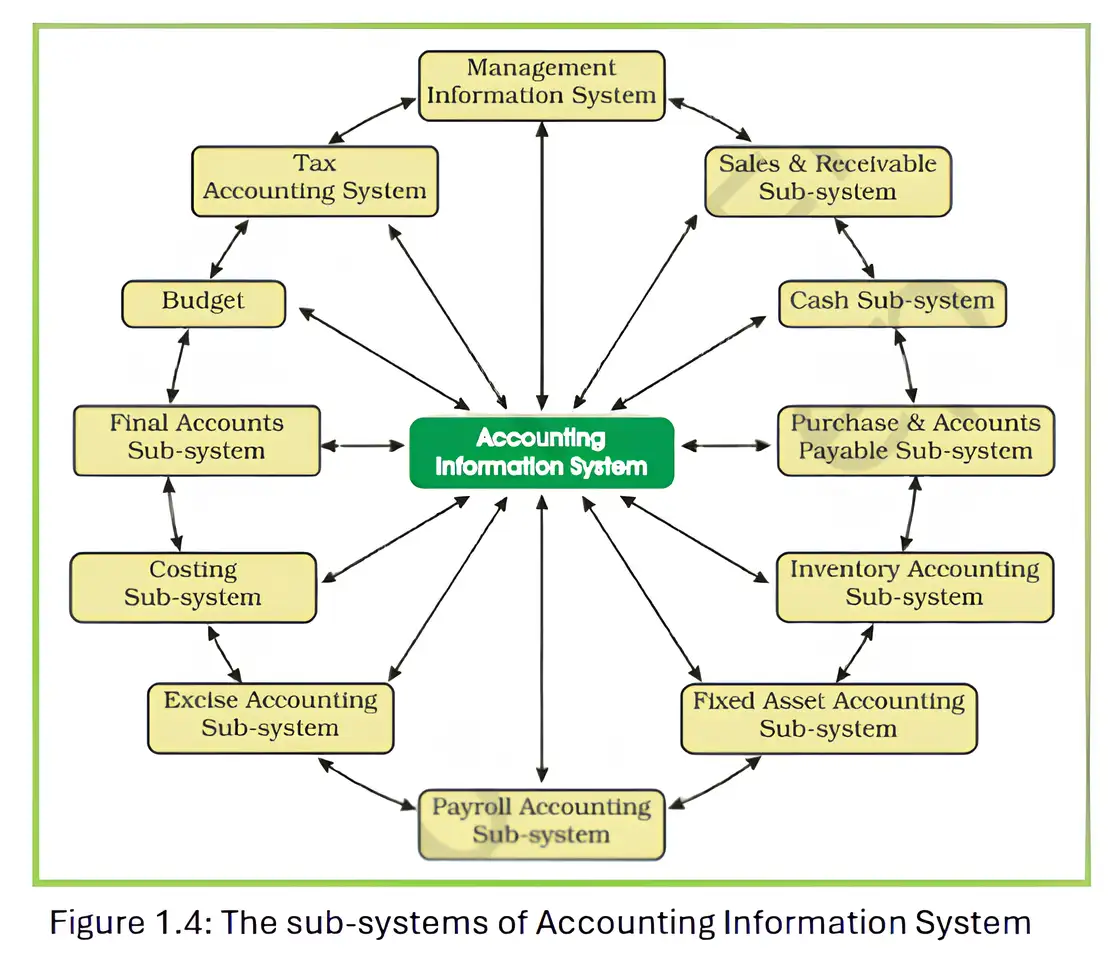
Cash and Bank Sub-system
- Purpose: This AIS sub-system records and monitors an organisation’s cash and bank transactions.
- Role: It supports the recording and reporting of cash receipts and payments.
Sales and Accounts Receivable Sub-system
- Purpose: This AIS sub-system records sales transactions and tracks amounts due from customers.
- Role: It provides information to monitor sales and customer collections.
Inventory Sub-system
- Purpose: This AIS sub-system maintains records of goods and other inventory items.
- Role: It helps provide information about inventory quantities and value.
Purchase and Accounts Payable Sub-system
- Purpose: This AIS sub-system records purchases and amounts payable to suppliers.
- Role: It supports the monitoring of supplier obligations and payments.
Payroll Accounting Sub-system
- Purpose: This AIS sub-system records employee wages and salaries.
- Role: It supports the calculation and reporting of employee payments.
Fixed Assets Accounting Sub-system
- Purpose: This AIS sub-system maintains records of an organisation’s fixed assets.
- Role: It provides information for monitoring assets and their accounting values.
Expense Accounting Sub-system
- Purpose: This AIS sub-system records and classifies the expenses incurred by an organisation.
- Role: It helps organise expense information for accounting and reporting.
Tax Accounting Sub-system
- Purpose: This AIS sub-system supports the recording and reporting of an organisation’s tax obligations.
- Role: It helps the organisation meet applicable tax requirements.
Final Accounts Sub-system
- Purpose: This AIS sub-system brings together accounting information for financial reporting.
- Role: It supports the preparation of reports on an organisation’s financial performance and position.
Costing Sub-system
- Purpose: This AIS sub-system supports the planning and monitoring of an organisation’s costs.
- Role: It provides cost information for analysing business operations.
Budget Sub-system
- Purpose: This AIS sub-system supports financial planning and performance monitoring.
- Role: It helps compare planned results with actual performance.
Management Information System
- Purpose: A Management Information System (MIS) generates and processes reports needed for management decisions.
- Flexibility: It should provide customised reports to meet different managerial information needs.
- Functions: MIS supports planning, organising, staffing, oversight, control and decision-making.
- Decision levels: It assists operational, functional and strategic management.
Quick recap
- AIS uses interconnected sub-systems to record and process accounting information.
- Cash and bank, sales and receivables, inventory, and purchases and payables handle key transaction cycles.
- Payroll, fixed-assets and expense sub-systems record employee payments, assets and expenses.
- Tax and final-accounts sub-systems support tax compliance and financial reporting.
- Costing uses linked information to determine production costs and report cost changes.
- The budget sub-system supports budgeting and comparison with actual performance.
- MIS supplies flexible reports for operational, functional and strategic management decisions.
Summary
Computerised Accounting System
- Meaning: A Computerised Accounting System (CAS) processes accounting transactions using computer hardware and software.
- Output: It produces accounting records and reports such as journals, ledgers, trial balances and financial statements.
Coding in CAS
- Purpose: Coding identifies account heads and other items processed in a CAS.
- Structure: The coding structure should match the hierarchy of the item being coded.
- Use: Account codes help organise and summarise information for the Balance Sheet and Statement of Profit and Loss.
Advantages and Limitations of CAS
- Advantages: CAS enables faster, more efficient and accurate processing while saving costs and maintaining data confidentiality.
- Limitations: Technology can become obsolete quickly; power interruptions or hardware damage may cause data loss, and systems face security risks.
Accounting Information System
- Meaning: An Accounting Information System (AIS) integrates related sub-systems to process accounting information.
- Sub-systems: These include cash and bank, sales and receivables, inventory, purchases and payables, payroll and fixed assets.
- Other areas: AIS also includes expense, tax, final accounts, costing, budget and management information sub-systems.
- Purpose: Together, the sub-systems provide information for accounting records, reports and management decisions.
Quick recap
- CAS processes accounting transactions using computer hardware and software.
- Accounting software is application software; Tally is one example.
- Coding structures should suit the elements being coded and support required summaries.
- CAS offers speed, efficiency, accuracy, cost saving and data confidentiality.
- CAS risks include rapid obsolescence, data loss and security hazards.
- AIS integrates specialised sub-systems, from cash and inventory to budgeting and management information.
Formula sheet
Accountancy — ALL CHAPTERS
1
Accounting for Share Capital
2
Issue and Redemption of Debentures
3
Financial Statements of a Company
4
Analysis of Financial Statements
5
Accounting Ratios
6
Cash Flow Statement
1
Overview Of Computerised Accounting System
2
Spreadsheet
3
Use Of Spreadsheet In Business Applications
4
Graphs And Charts For Business Data
1
Accounting for Partnership: Basic Concepts
2
Reconstitution of a Partnership Firm –Admission of a Partner
3
Reconstitution of a Partnership Firm –Retirement/Death of a Partner
4
Dissolution of Partnership Firm